EpiFive Student & Job-seeker Pack
Plan your studies, know your grades and run your job search, all in Excel. An exam countdown and study planner, a CGPA/GPA calculator for India and the US, and a job application tracker.
₹199one-time payment
- Instant download after payment
- 7-day refund, no questions asked
- Payments by Razorpay (UPI, cards, netbanking)
Shown in INR for India and USD elsewhere; switch any time. Taxes, if any, are shown at checkout.

Free vs Pro
| Feature | Free sample | Pro |
|---|---|---|
| Works in Excel 2016 or later on Windows and Mac, no macros | Included | Included |
| Instructions sheet in the file | Included | Included |
| Sample-data and blank versions | Included | Included |
| Yellow input cells, drop-downs and color-coded alerts | Included | Included |
| Study Planner with exam countdown, weekly timetable and hours vs target | Not included | Included |
| CGPA / GPA calculator with editable grade scales and a target planner | Not included | Included |
| US 4.0 GPA, weighted (Honors / AP-IB) and unweighted | Not included | Included |
| Job Application Tracker with follow-up reminders and response rates by source | Not included | Included |
| 1 year of updates and priority email support | Not included | Included |
| Price | Free | ₹199 · $5 |
Free = the Attendance Tracker & 75% Calculator (one template, emailed to you). Pro = the full Student & Job-seeker Pack.
What's included
| Template | What it does |
|---|---|
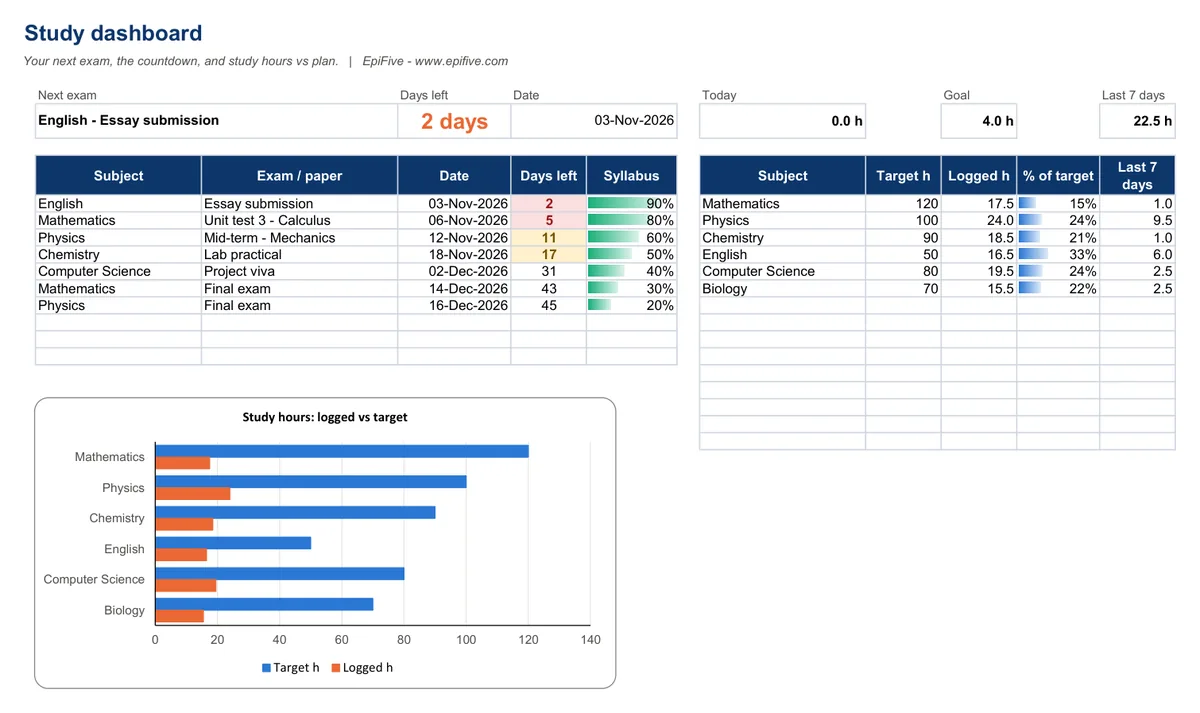
| Study Planner & Exam Countdown | Exams with countdown and status, weekly timetable (6 AM to 10 PM), study log, hours vs target, dashboard and chart |
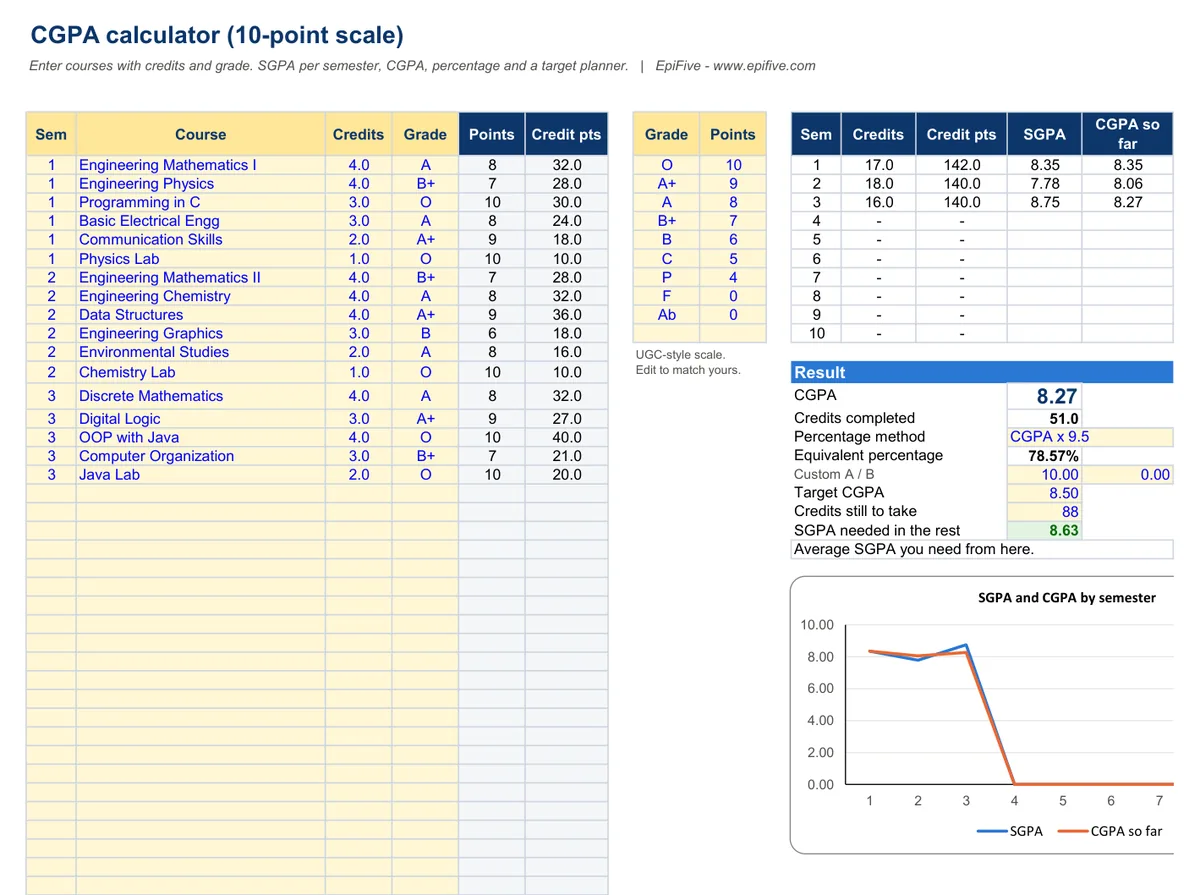
| CGPA / GPA & Percentage Calculator | Indian 10-point CGPA with editable grade scale, SGPA per semester, percentage conversion, target planner; US 4.0 GPA, weighted and unweighted, by term |
| Job Application Tracker | 500 applications, status pipeline, follow-up reminders, response and interview counts by source, weekly activity chart |
Each template comes with a sample-data version and a blank version. The free CGPA to percentage converter runs in your browser if you only need one number.
Why it helps
- Always know what's next. Your next exam and its countdown sit at the top, with the next ten in date order.
- Study to a plan. A weekly timetable with color per subject, a study log, and hours studied vs your target for every subject.
- Know your CGPA and what you need. SGPA per semester, CGPA, percentage conversion and the SGPA you need to reach a target. There's also a US 4.0 GPA sheet with weighted (Honors/AP) GPA.
- Run your job search like a pipeline. Every application, contact and follow-up in one place, with response rates by source (LinkedIn, Naukri, Indeed, referrals and more).
Install guide
- After payment, click the download button on the success page or in your order email. You get one ZIP file.
- Right-click the ZIP and choose Extract All (Windows) or double-click it (Mac). Save the folder somewhere permanent, such as Documents or OneDrive.
- Open a template in Excel 2016, 2019, 2021, Microsoft 365 or Excel for Mac 2016 or later. If Excel shows Protected View, click Enable Editing. There are no macros, so there is nothing else to allow.
- Start with the Instructions sheet. Type only in the yellow cells and pick from the drop-downs; gray cells are formulas.
- Open the sample-data version to see it working, then use the blank version for your own data.
Works with
- Excel 2016, 2019, 2021 and Microsoft 365 on Windows, and Excel for Mac 2016 or later.
- No macros and no add-ins, so there are no security prompts.
- We tested every file in Microsoft 365 Excel for Windows (full recalculation, zero formula errors) and used only functions that also exist in Excel 2016.
License
Use the templates in your own home or business, and edit them as much as you like. Please don’t resell, share or upload the files for others to download.
Get the free Attendance Tracker & 75% Calculator
Your attendance %, how many classes in a row you must attend, and how many you can safely miss. Same build as the paid pack: try it before you buy.
Questions
Which CGPA-to-percentage formula does it use?
You choose. It includes CGPA x 9.5, (CGPA - 0.75) x 10, CGPA x 10 and a custom formula. India has no single official conversion, so use the one your university or board publishes.
My college uses different grade points.
The grade scale is editable on the same sheet.
Does it work on a Mac?
We used only functions available in Excel for Mac 2016 and later. Our testing was in Excel for Windows.
How do I get the files?
Straight after payment you see a download button, and we email you the same secure link. The link works for 7 days and 5 downloads, so save the ZIP. If it expires or the email does not arrive, write to [email protected] with your Razorpay payment ID or PayPal transaction ID and we will send a new one.
Which payment methods work?
In India: Razorpay Checkout (UPI, cards, netbanking and wallets), in rupees. Outside India: PayPal (your PayPal balance or a card), charged in US dollars. The page picks the right one for your country; use the "Paying from outside India?" link to switch.