EpiFive Personal Finance Pack
See your whole financial picture in Excel. A 50/30/20 budget, a loan EMI and amortization calculator, a savings goal tracker and a debt snowball vs avalanche planner.
₹299one-time payment
- Instant download after payment
- 7-day refund, no questions asked
- Payments by Razorpay (UPI, cards, netbanking)
Shown in INR for India and USD elsewhere; switch any time. Taxes, if any, are shown at checkout.
Free vs Pro
| Feature | Free sample | Pro |
|---|---|---|
| Works in Excel 2016 or later on Windows and Mac, no macros | Included | Included |
| Instructions sheet in the file | Included | Included |
| Sample-data and blank versions | Included | Included |
| Yellow input cells, drop-downs and color-coded alerts | Included | Included |
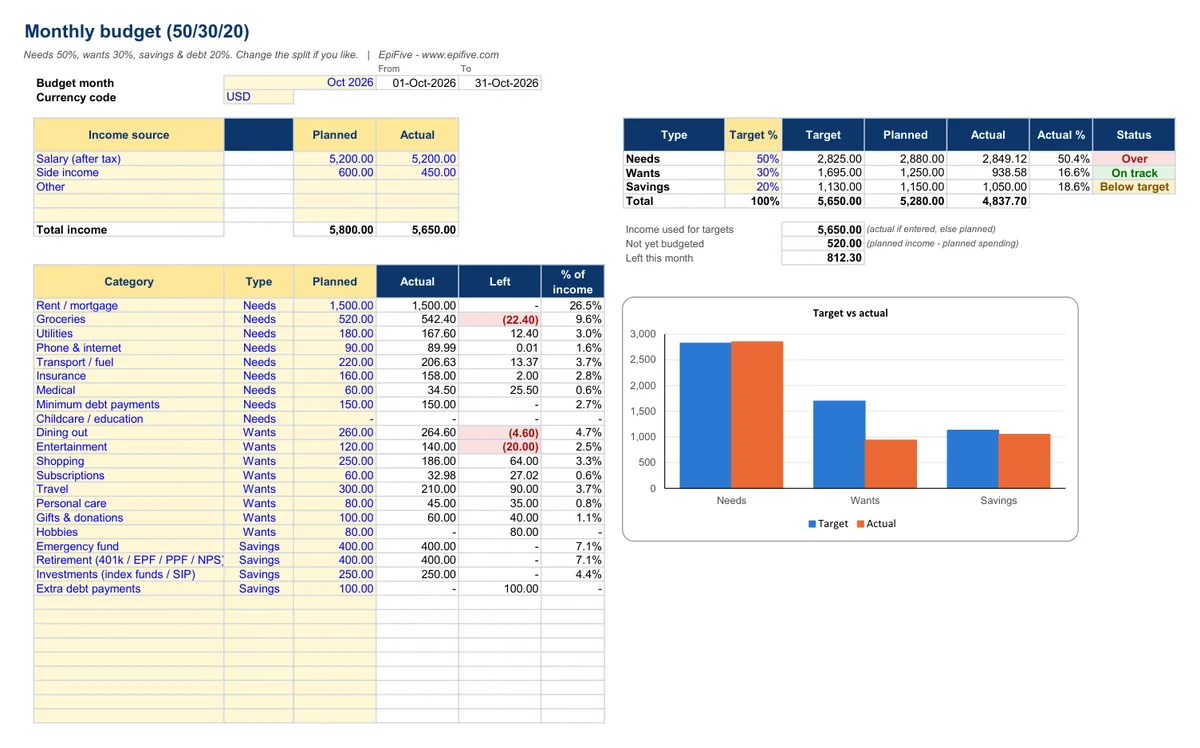
| Monthly Budget with an editable 50/30/20 split and plan vs actual | Not included | Included |
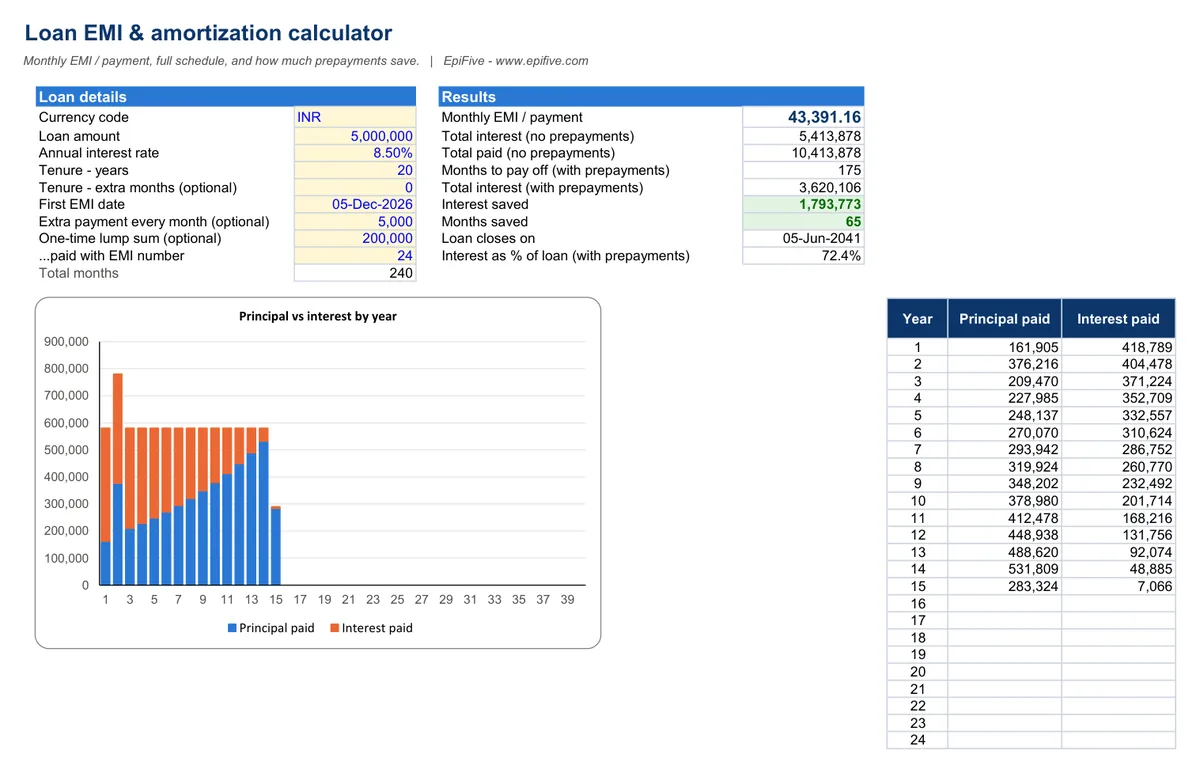
| Loan EMI and amortization schedule up to 40 years, with prepayment savings | Not included | Included |
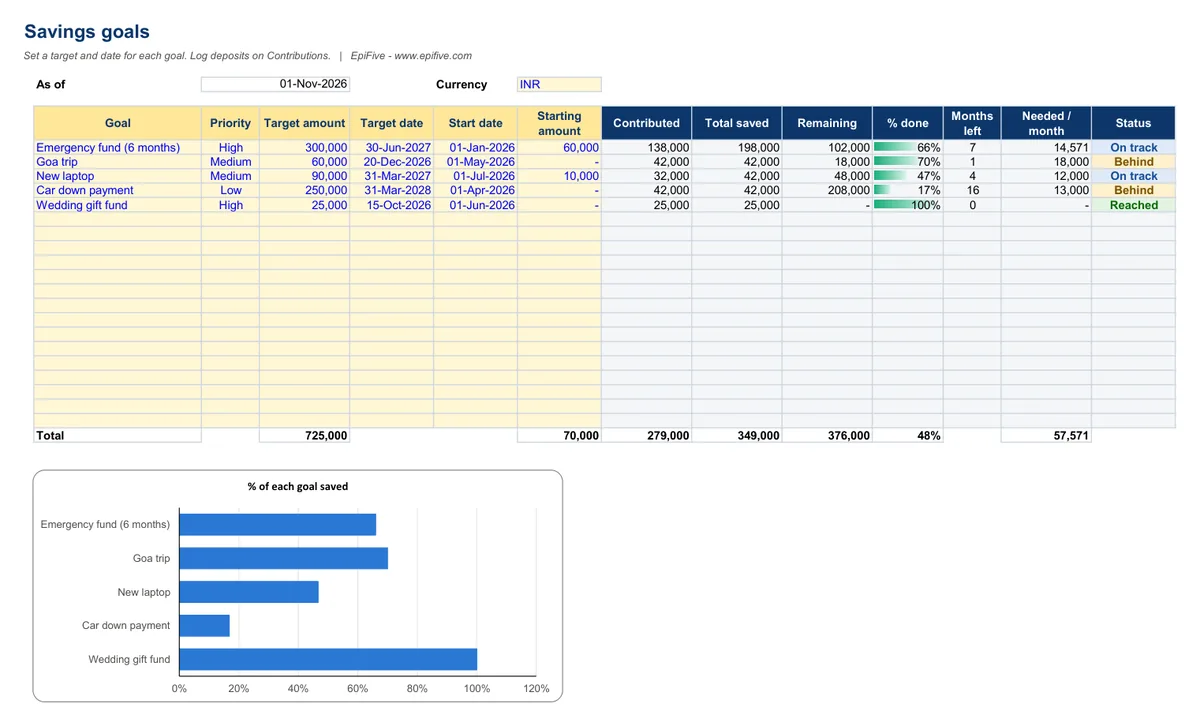
| Savings Goal Tracker for up to 20 goals with on-track status | Not included | Included |
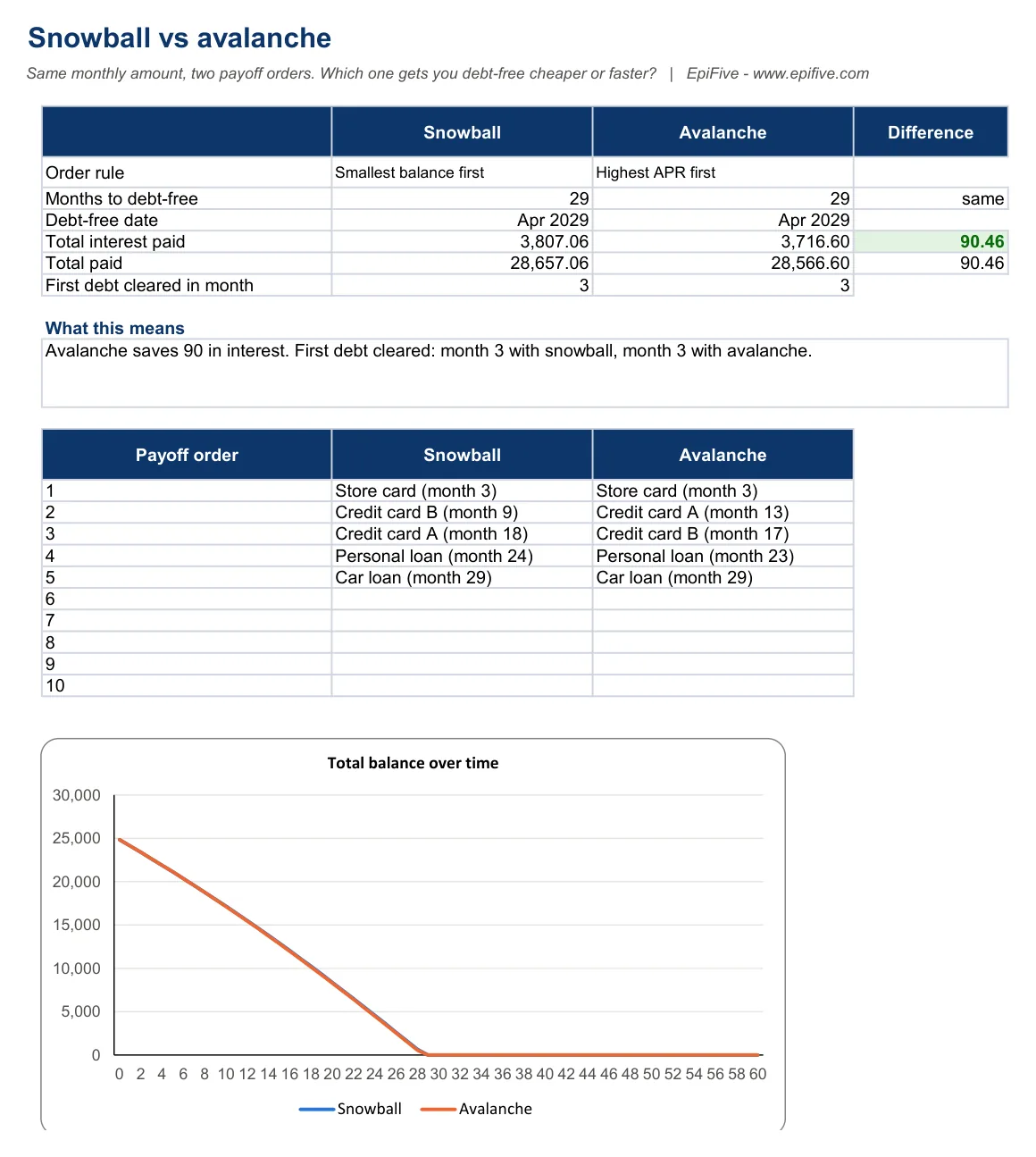
| Debt Snowball vs Avalanche for up to 10 debts, month by month | Not included | Included |
| 1 year of updates and priority email support | Not included | Included |
| Price | Free | ₹299 · $7 |
Free = the SIP / Investment Growth Calculator (one template, emailed to you). Pro = the full Personal Finance Pack.
What's included
| Template | What it does |
|---|---|
| Monthly Budget (50/30/20) | Income plan, 30 categories with Needs/Wants/Savings type, transaction log, 50/30/20 panel with status, chart |
| Loan EMI & Amortization Calculator | EMI (same formula as Excel's PMT), up to 40-year schedule, monthly and one-time prepayments, interest and months saved, yearly chart |
| Savings Goal Tracker | Up to 20 goals, contributions log, % done, months left, amount needed per month, on-track status, chart |
| Debt Snowball vs Avalanche | Up to 10 debts, month-by-month plans for both methods, debt-free date, total interest, payoff order, balance chart |
Each template comes with a sample-data version and a blank version. Want a quick number first? The free EMI calculator and SIP calculator run in your browser.
Why it helps
- Budget with a simple rule. Plan your month and see whether needs, wants and savings stay near 50/30/20 (or your own split).
- Know the true cost of a loan. See your EMI, total interest and the full schedule. Find out how much a monthly prepayment or a lump sum saves, in money and months.
- Hit your savings goals on time. For every goal you see how much is saved, how much to put away each month, and whether you're on track.
- Choose the best way out of debt. Compare snowball (smallest balance first) and avalanche (highest interest first) with your real debts: months to debt-free, total interest and the payoff order.
Install guide
- After payment, click the download button on the success page or in your order email. You get one ZIP file.
- Right-click the ZIP and choose Extract All (Windows) or double-click it (Mac). Save the folder somewhere permanent, such as Documents or OneDrive.
- Open a template in Excel 2016, 2019, 2021, Microsoft 365 or Excel for Mac 2016 or later. If Excel shows Protected View, click Enable Editing. There are no macros, so there is nothing else to allow.
- Start with the Instructions sheet. Type only in the yellow cells and pick from the drop-downs; gray cells are formulas.
- Open the sample-data version to see it working, then use the blank version for your own data.
Works with
- Excel 2016, 2019, 2021 and Microsoft 365 on Windows, and Excel for Mac 2016 or later.
- No macros and no add-ins, so there are no security prompts.
- We tested every file in Microsoft 365 Excel for Windows (full recalculation, zero formula errors) and used only functions that also exist in Excel 2016.
License
Use the templates in your own home or business, and edit them as much as you like. Please don’t resell, share or upload the files for others to download.
Get the free SIP / Investment Growth Calculator
Project a monthly investment with a yearly step-up, a lump sum and the inflation-adjusted value. Same build as the paid pack: try it before you buy.
Questions
Does the EMI match my bank's?
It uses the standard reducing-balance method with monthly interest, which is what most banks use for home, car and personal loans. Small differences can come from rounding, the exact day your EMI starts, or your bank's own rules for prepayments.
Is this financial advice?
No. These are calculators and planners that make the numbers clear. The decisions are yours.
India or US?
Both. Amounts work in any currency, and the wording covers EMI and US monthly payments, EPF/PPF/NPS and 401(k)/IRA.
Will it work in Google Sheets?
We built and tested the templates for Excel. Most formulas are standard and usually work after you upload the file to Google Sheets, but we haven't tested Sheets, and charts or some formatting may look different. Try the free sample first.
How do I get the files?
Straight after payment you see a download button, and we email you the same secure link. The link works for 7 days and 5 downloads, so save the ZIP. If it expires or the email does not arrive, write to [email protected] with your Razorpay payment ID or PayPal transaction ID and we will send a new one.
Which payment methods work?
In India: Razorpay Checkout (UPI, cards, netbanking and wallets), in rupees. Outside India: PayPal (your PayPal balance or a card), charged in US dollars. The page picks the right one for your country; use the "Paying from outside India?" link to switch.