EpiFive IT Admin Pack
Excel tools for the work IT admins actually do. Find wasted Microsoft 365 licenses, catch warranty and renewal dates before they pass, see Azure spend by resource group and tag, and run repeatable onboarding and offboarding.
₹499one-time payment
- Instant download after payment
- 7-day refund, no questions asked
- Payments by Razorpay (UPI, cards, netbanking)
Shown in INR for India and USD elsewhere; switch any time. Taxes, if any, are shown at checkout.

Free vs Pro
| Feature | Free sample | Pro |
|---|---|---|
| Works in Excel 2016 or later on Windows and Mac, no macros | Included | Included |
| Instructions sheet in the file | Included | Included |
| Sample-data and blank versions | Included | Included |
| Nothing connects to your tenant; you paste exports in | Included | Included |
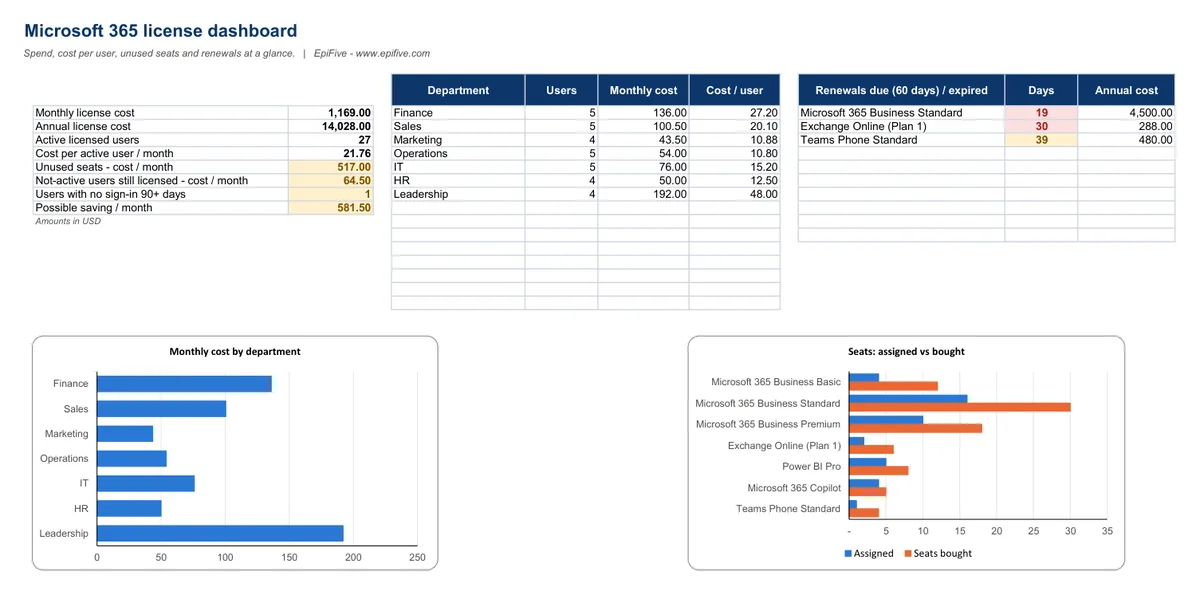
| Microsoft 365 License Tracker with cost per active user and unused seats | Not included | Included |
| Flags for licensed leavers and accounts with no sign-in for 90+ days | Not included | Included |
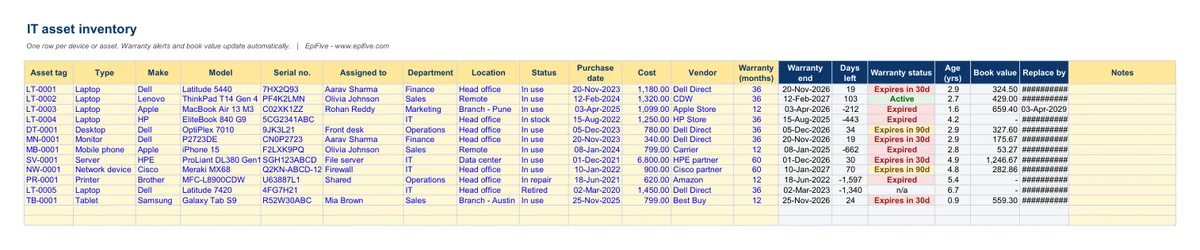
| IT Asset Inventory with warranty alerts and straight-line book value | Not included | Included |
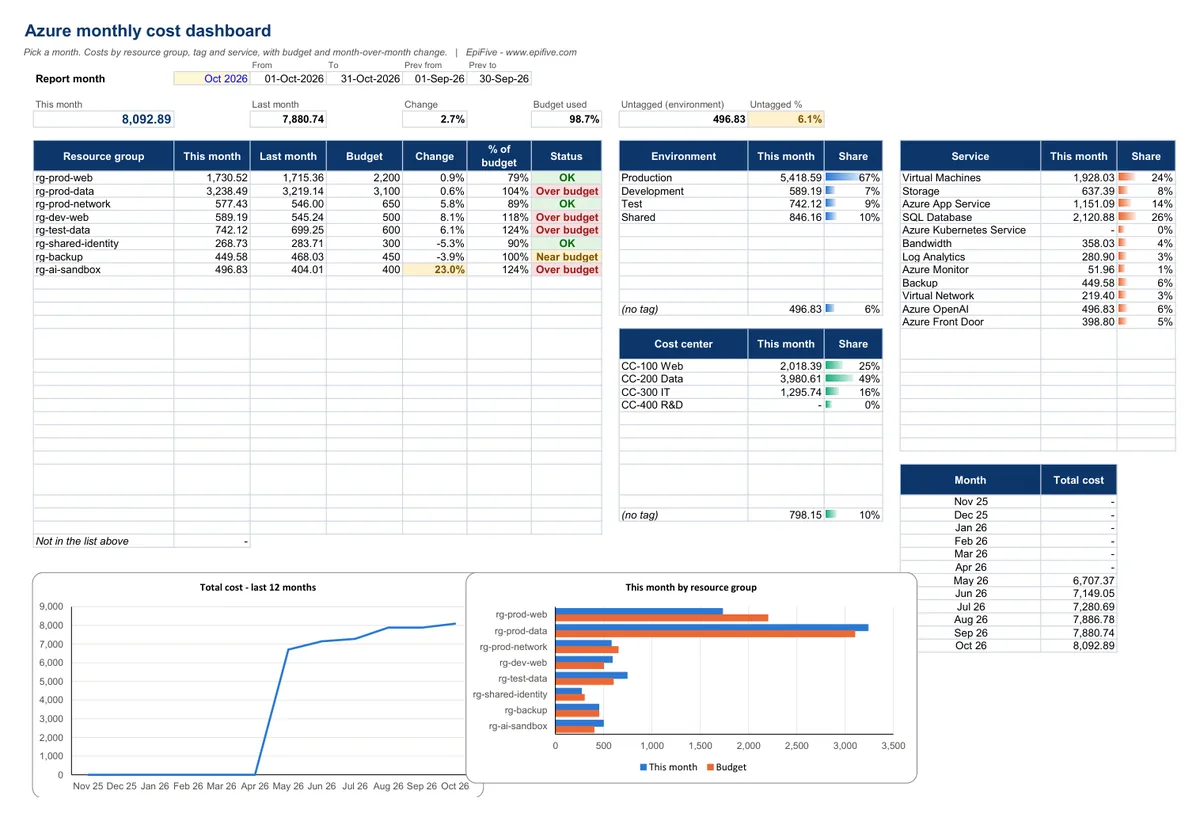
| Azure Monthly Cost Tracker by resource group, tag and service vs budget | Not included | Included |
| Onboarding and offboarding checklists with owners, due dates and overdue flags | Not included | Included |
| 1 year of updates and priority email support | Not included | Included |
| Price | Free | ₹499 · $12 |
Free = the SSL Certificate & Domain Renewal Tracker (one template, emailed to you). Pro = the full IT Admin Pack.
What's included
| Template | What it does |
|---|---|
| Microsoft 365 License Tracker | SKUs with your contract price, seats, utilization and renewal status; users with up to 3 licenses; flags for inactive or unlicensed accounts; cost by department; dashboard with charts |
| IT Asset Inventory with Warranty Alerts | 500-asset register, warranty end and status, age, straight-line book value, replace-by date, dashboard by type and status |
| Azure Monthly Cost Tracker | Paste-in cost data (5,000 rows), resource-group budgets, tag and service breakdowns, untagged cost, 12-month trend |
| User Onboarding & Offboarding Checklist | Editable 15-task lists, Done/Pending/N/A grid, % done, overdue tasks, status, open tasks per team |
Each template comes with a sample-data version and a blank version.
Why it helps
- Cut license waste. See cost per active user, unused seats and licenses still assigned to disabled accounts or leavers. These are the usual places to save money.
- No surprise renewals or expired warranties. Subscriptions renewing within 30 or 60 days and devices whose warranty ends within 30 or 90 days are flagged automatically.
- Explain your Azure bill. Paste a Cost Management export and get cost by resource group against budget, month-over-month change, environment and cost-center tags (including untagged spend), services and a 12-month trend.
- Make onboarding and offboarding repeatable. One checklist per joiner or leaver, with an owner team and due date for every task and red flags on anything overdue.
Install guide
- After payment, click the download button on the success page or in your order email. You get one ZIP file.
- Right-click the ZIP and choose Extract All (Windows) or double-click it (Mac). Save the folder somewhere permanent, such as Documents or OneDrive.
- Open a template in Excel 2016, 2019, 2021, Microsoft 365 or Excel for Mac 2016 or later. If Excel shows Protected View, click Enable Editing. There are no macros, so there is nothing else to allow.
- Start with the Instructions sheet. Type only in the yellow cells and pick from the drop-downs; gray cells are formulas.
- Open the sample-data version to see it working, then use the blank version for your own data.
Works with
- Excel 2016, 2019, 2021 and Microsoft 365 on Windows, and Excel for Mac 2016 or later.
- No macros and no add-ins, so there are no security prompts.
- We tested every file in Microsoft 365 Excel for Windows (full recalculation, zero formula errors) and used only functions that also exist in Excel 2016.
License
Use the templates in your own home or business, and edit them as much as you like. Please don’t resell, share or upload the files for others to download.
Get the free SSL Certificate & Domain Renewal Tracker
Certificates, domains and subscriptions with color-coded expiry alerts. Public TLS certificate lifetimes drop to 200 days in 2026, 100 in 2027 and 47 in 2029. Same build as the paid pack: try it before you buy.
Questions
Does it connect to my Microsoft 365 tenant or Azure subscription?
No. Nothing in the files connects anywhere. You export data from the admin centers and paste it in, which also means no permissions or app registrations are needed.
Are Microsoft prices included?
The sample file has example prices for illustration only. Enter the price from your own invoice, because prices vary by region, term, billing frequency and partner, and Microsoft changes them over time.
Which Azure export columns do I need?
Date (or billing period), subscription, resource group, resource name, meter category (service), your environment and cost-center tags, and cost. The Instructions sheet explains how to map them, including the Tags column.
Can I change the task lists?
Yes. The onboarding and offboarding task lists are editable, with an owner team and a due offset for each task.
How do I get the files?
Straight after payment you see a download button, and we email you the same secure link. The link works for 7 days and 5 downloads, so save the ZIP. If it expires or the email does not arrive, write to [email protected] with your Razorpay payment ID or PayPal transaction ID and we will send a new one.
Which payment methods work?
In India: Razorpay Checkout (UPI, cards, netbanking and wallets), in rupees. Outside India: PayPal (your PayPal balance or a card), charged in US dollars. The page picks the right one for your country; use the "Paying from outside India?" link to switch.